
Taking Action
Much of Allies of Majesty is played in a freeform, narrative style. Once combat begins, the game shifts into a turn-based format where each character will have their own Turns during which they can perform any actions they wish to perform.
In Allies of Majesty combat is not a single "round" where everyone acts once. Instead, action is measured in Cycles, which are divided into Segments.
Action Points
Your character's Speed is the total activity they can accomplish in one full Cycle. This activity is played out using Action Points, or AP Action Points are used to Move, Strike, perform Spiritual Effects, and perform other actions. The total AP each character will act for in one full Cycle is equal to their Speed.
{Ex. Herald has a Speed of 10, and so would have 10 total Action Points during a Cycle.}
Action Point Distribution
Characters do not receive all their Action Points at once. Their total AP are spread across multiple Turns in different Segments with each Turn having no more than 7 AP. The number of Segments in 1 Cycle flexes depending on the highest Speed among the characters involved. Segments are divided into numbered Segments (1, 2, 3, etc.) and lettered Segments (A, B, C, etc.).

Early on, most characters will only act during two Segments (Segment 1 and Segment A), but as characters and enemies become faster, the number of Segments will increase. Segments and Turns are tracked using a War Scroll that will look something like this.
Sample War Scroll
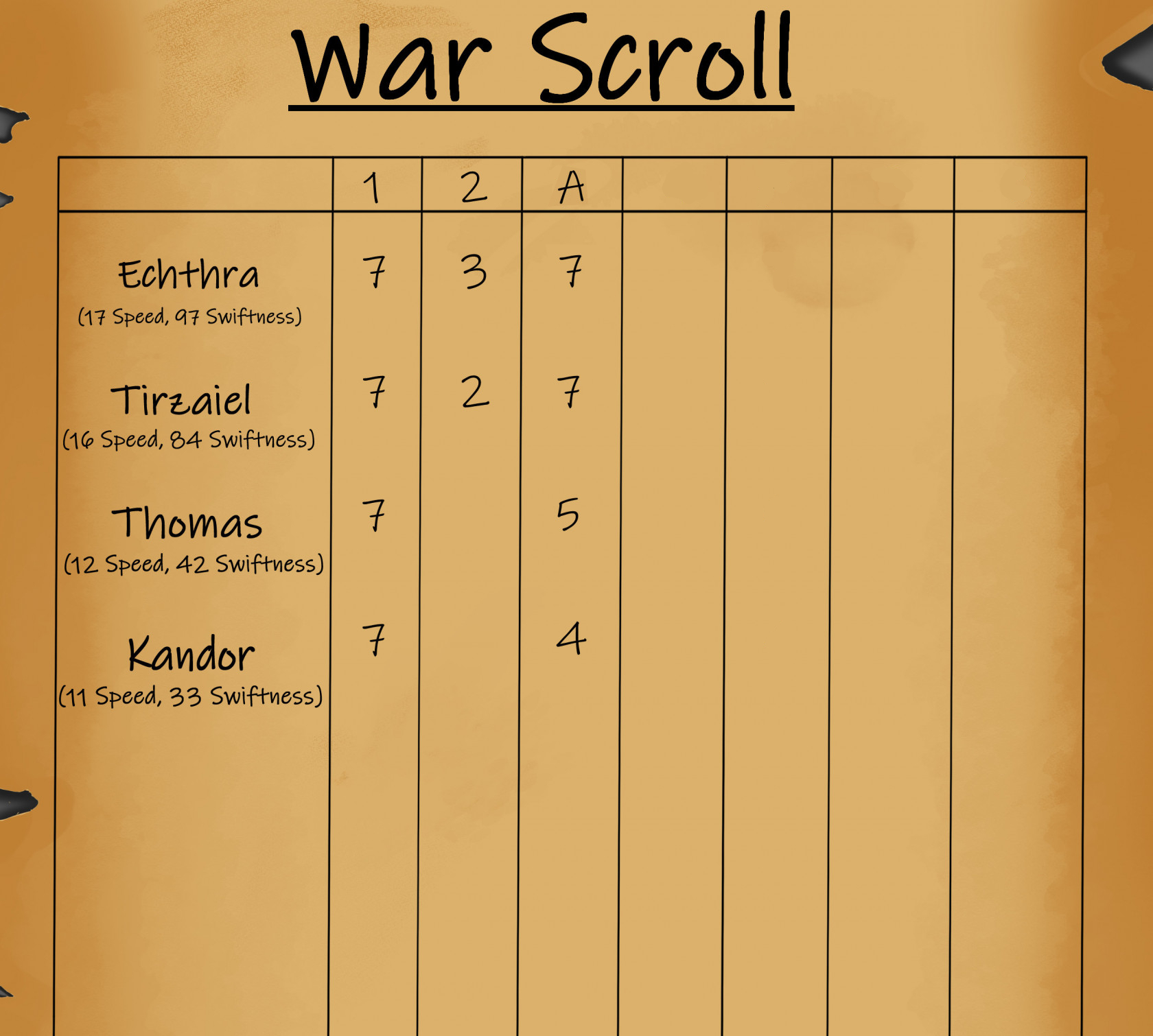
This sample War Scroll also includes each character's relative Speed and Swiftness to aid in understanding.
Turn Order
Characters act in order of their Swiftness (highest to lowest). While every character takes a a Turn during Segment 1, the total number of Turns a character receives during a Cycle depends on their Speed. To ensure a more balanced flow of activity, character Turns are assigned to alternating numbered and lettered Segments (1 then A, 2 then B, 3 then C, etc.) Each Turn will contain up to 7 AP.
Reading a War Scroll
The War Scroll guides the flow of War. The War scroll starts with Segment 1 from top to bottom, then proceeds to the top of the next column in order from left to right. Once the last character has a Turn in the last Segment, a new Cycle begins.
If you were to follow the War Scroll above, the first character to have a Turn would be Echthra for 7 Action Points. After Echthra, Tirzaiel would have a Turn for 7 AP. Then Thomas for 7 AP and finally Kandor for 7 AP. That would conclude Segment 1 and Segment 2 would begin with Echthra for 3 AP followed by Tirzaiel for 2 AP concluding Segment 2.
Segment A would be next with Echthra for 7 AP, Tirzaiel for 7 AP, Thomas for 5 AP, and finally Kandor for 4 AP. With no more Segments, a new Cycle would begin at the top of Segment 1 with Echthra's Turn for 7 AP.
Creating a War Scroll
The easiest way to create the War Scroll is to use our Allies Assistant app! Simply enter each character's information and it will automatically create an accurate War Scroll.
If filling out a War Scroll manually, start by sorting all the characters involved by their Swiftness, highest to lowest. (In the event of a tie, holy elohim go first. If the tie involves elohim of the same allegiance, the Host determines who acts first.) Write the characters' names from highest to lowest Swiftness down the leftmost column leaving space for notes between each name.
Next, determine how many Segments you should plan for. Divide the fastest character's Speed by 7. If there is any remainder, round up. The result is how many Segments there will be in the Cycle. (e.g. If the fastest character has a Speed of 25, plan for 4 Segments. 24 ÷ 7 is 3.42 rounded up to 4.) There are a few effects that can Increase a character's Speed, so it may be a good idea to leave a little room between the numbered Segments and the lettered Segments in case you need to add in more Segments later if needed.
Once you have determined the Turn order and the how many Segments are needed, you can begin assigning each character's Action Points. AP are assigned in a pattern alternating between numbered Segments and lettered Segments. Assign each character's AP to Segment 1 until you reach 7 AP or run out of AP to assign. Any characters who have AP left will have them assigned to Segment A, up to 7 AP. Any characters who have AP left will have them assigned to Segment 2, up to 7 AP. Next would be Segment B, then Segment 3, and so on until all characters have all their AP have been assigned.
Changes in Speed and Swiftness
Temporary changes in Speed are easily reflected in the War Scroll by adding additional AP and additional Turns and Segments as necessary.
Changes in Swiftness during War are rare, and most often will be due to becoming Weakened. If a character's Swiftness changes after you have the War Scroll complete, do not rearrange the Turn order on the War Scroll. Doing so adds too many complications and could lead to double Turns, skipped Turns, or other confusing situations.
Bonus Action Points
A character can receive bonus Actions Points during their current Turn or their next upcoming Turn. A character can never act with more than 12 Action Points during a single Turn. Any AP exceeding 12 should be spilled over into the character's next Turn. The Swiftness Perk that allows a character to immediately take an Action for free does not count toward this total as it is technically giving the character an Action rather than AP.
Delaying Action Points
A character may choose to delay the use of some Action Points from one Turn into their next Turn that has fewer than 7 AP. This is called Carrying Over Action Points and no more AP can be Carried Over than would increase that Turn above 7 AP. The other option for delaying AP is to Stand Ready.
Preparation at the Onset of War
When War is begins, players will often want to quickly ready a weapon, enter Defensive Stance, use a Spiritual Effect, or react in some other way. Once the Host declares that War is beginning, characters will need to wait until they have a Turn to take action. Acting sooner is part of the benefit for characters with higher Swiftness. If a character needs to act before they would have a Turn, they can use Inspiration or a Swiftness Perk.
Durations
The Durations for many effects are measured in Cycles. Each following Cycle, at the end of the same Turn when the effect began, the Duration will decrease by 1 Cycle or expire.